The Problem Nobody's Talking About
We've spent the last year obsessing over what agents do. It's time we talked about how we work with them.
If you've spent any real time working with AI coding agents, you've probably noticed something: the agents themselves aren't the bottleneck anymore. They can write code, debug issues, refactor entire modules. The models keep getting better, the tooling keeps improving.
But here's what keeps tripping me up, and I suspect it's the same for you:
How do I orchestrate them?
Not "how do I prompt them" or "what model do I use." The unsexy, operational stuff:
- How do I know when an agent is done?
- How do I keep track of what five agents are doing across three projects?
- How do I stop tab-switching between terminal windows like a human process scheduler?
- How do I maintain a mental model of everything that's in flight?
I realized the problem isn't the agent. It's me, the human trying to supervise the agents. And the tooling we have today treats each agent as an isolated session in an isolated terminal. That's fine when you have one. It falls apart when you have five.
So I built Supervisor.
What Supervisor Does
Supervisor is a desktop app that puts all your running agent sessions on an infinite canvas, scoped to the projects they belong to. Instead of juggling terminal tabs, you get a single, spatial workspace where every agent is visible, interactive, and organized.
Think of it like this: you're not sitting inside a terminal anymore. You're standing above the factory floor, looking down at all the workers, seeing who's busy, who's stuck, and who just finished.
The Canvas
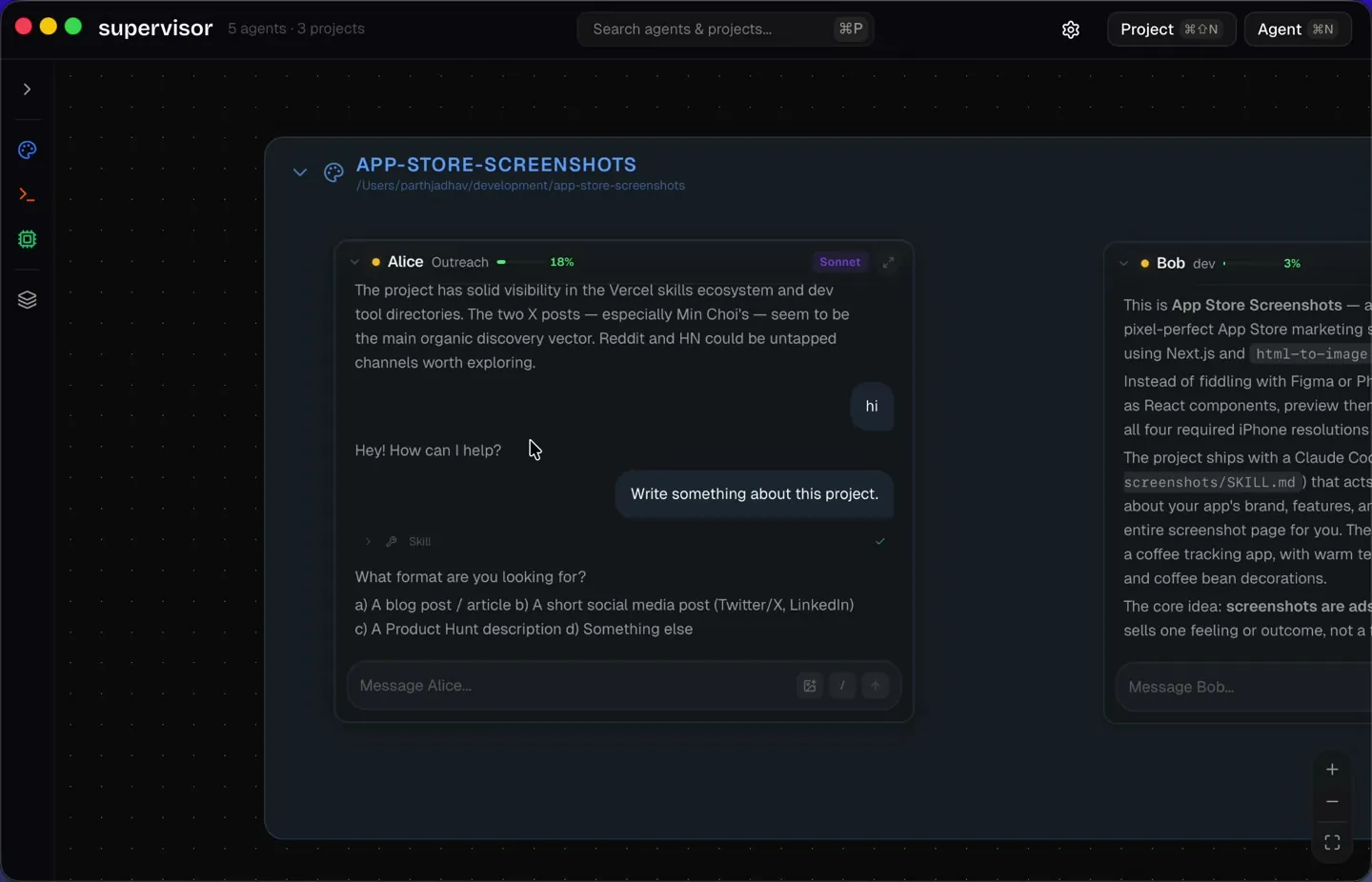
Every agent lives as a card on an infinite, pannable, zoomable canvas. You can drag them around, resize them, snap them to a grid, and group them by project. Each project gets its own color, so you can tell at a glance which agents belong where.
You're not switching contexts. You're seeing all the context at once.
Focus View
"But won't seeing everything at once be overwhelming?"
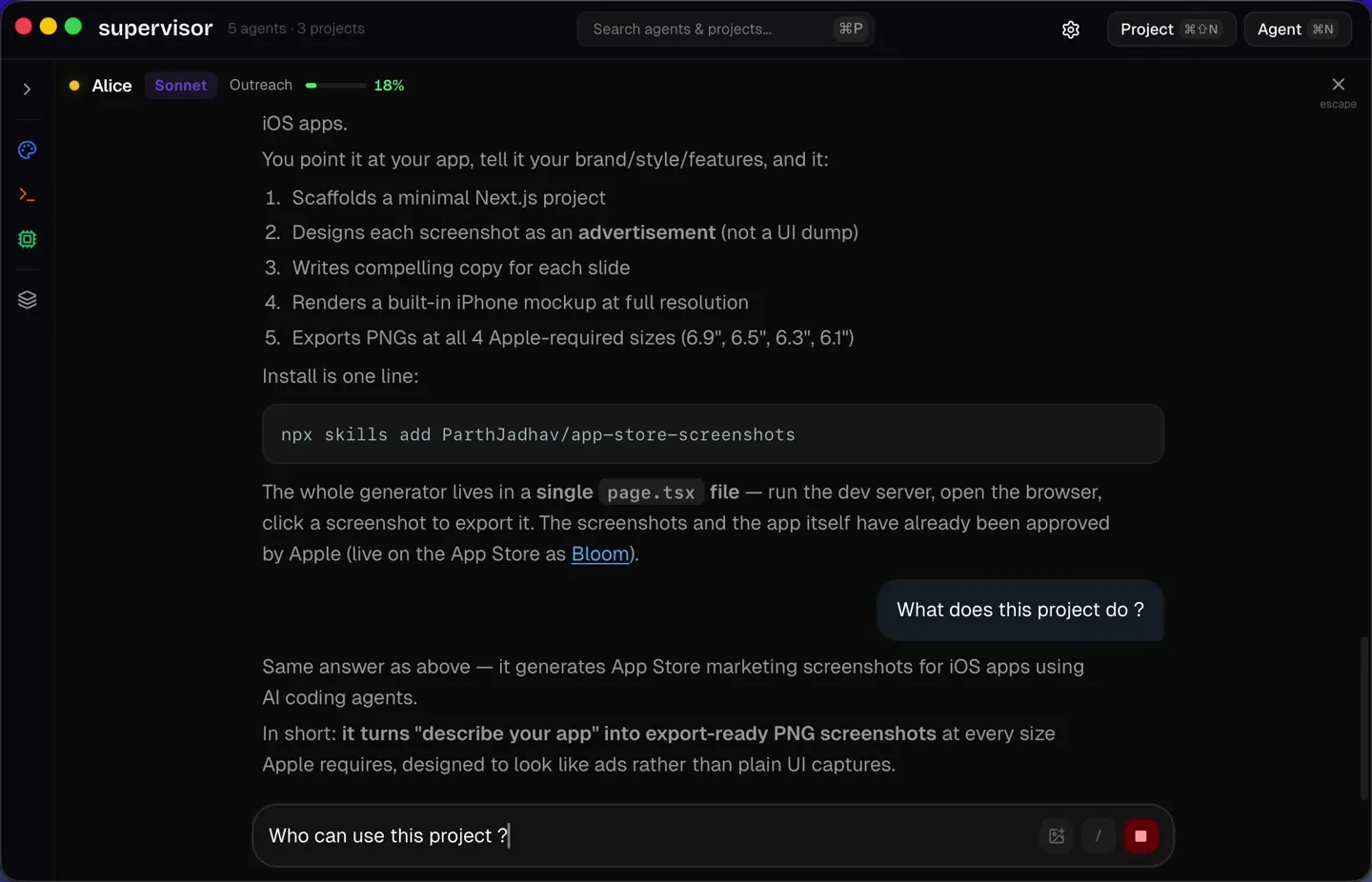
Yes, sometimes. That's why there's a Focus View. Click into any agent and it expands to a full-screen, distraction-free workspace where you can have a deep conversation with just that one agent. When you're done, zoom back out to the canvas.
It's the difference between a map and a magnifying glass. You need both.
Agents Scoped to Codebases
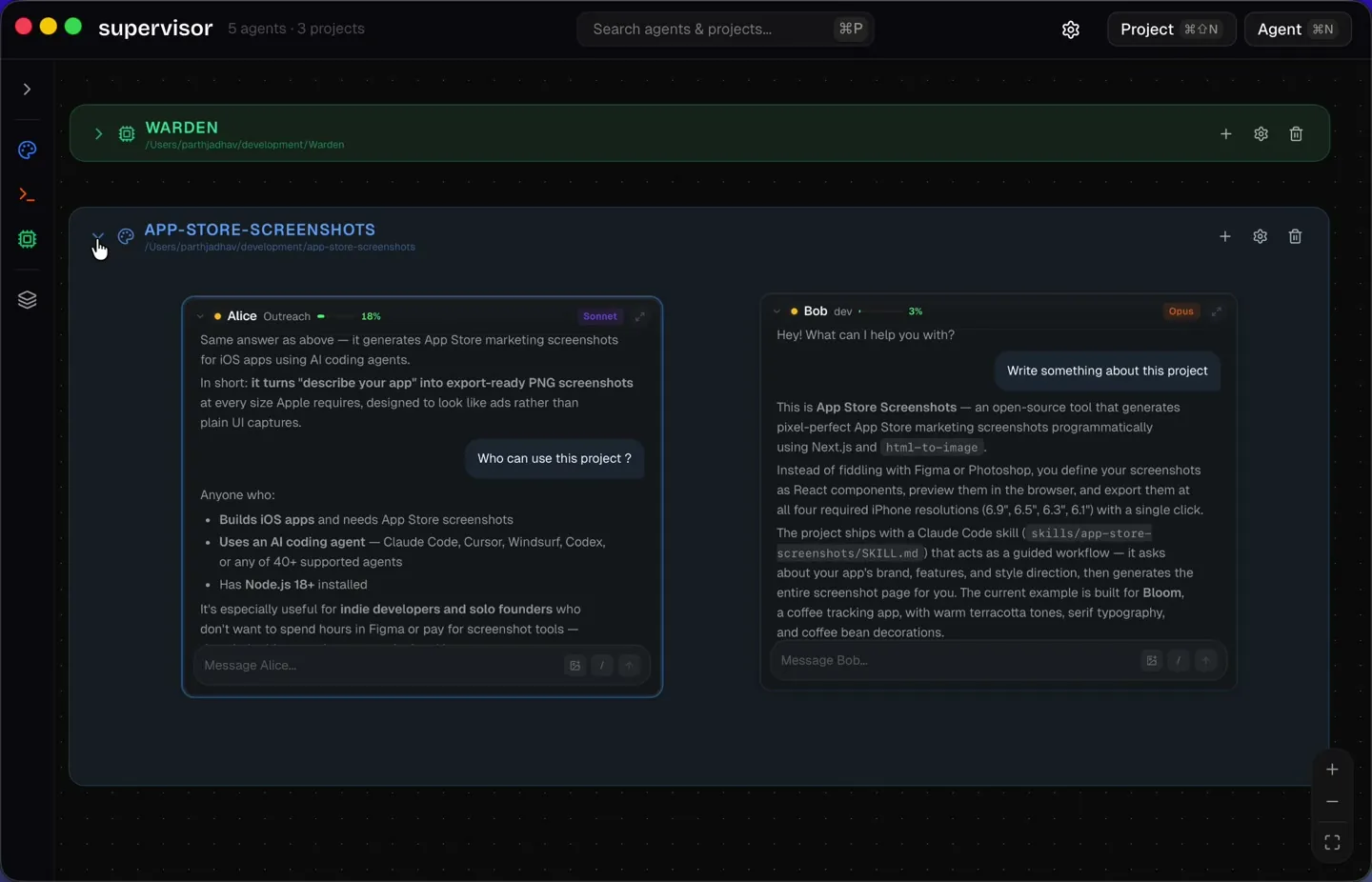
Register a project directory, and every agent you spin up under that project inherits its context. The agent knows which codebase it's operating in. No manual cd into the right folder. No pasting file paths. The scope is set, and the agent works within it.
Navigate at the Speed of Thought
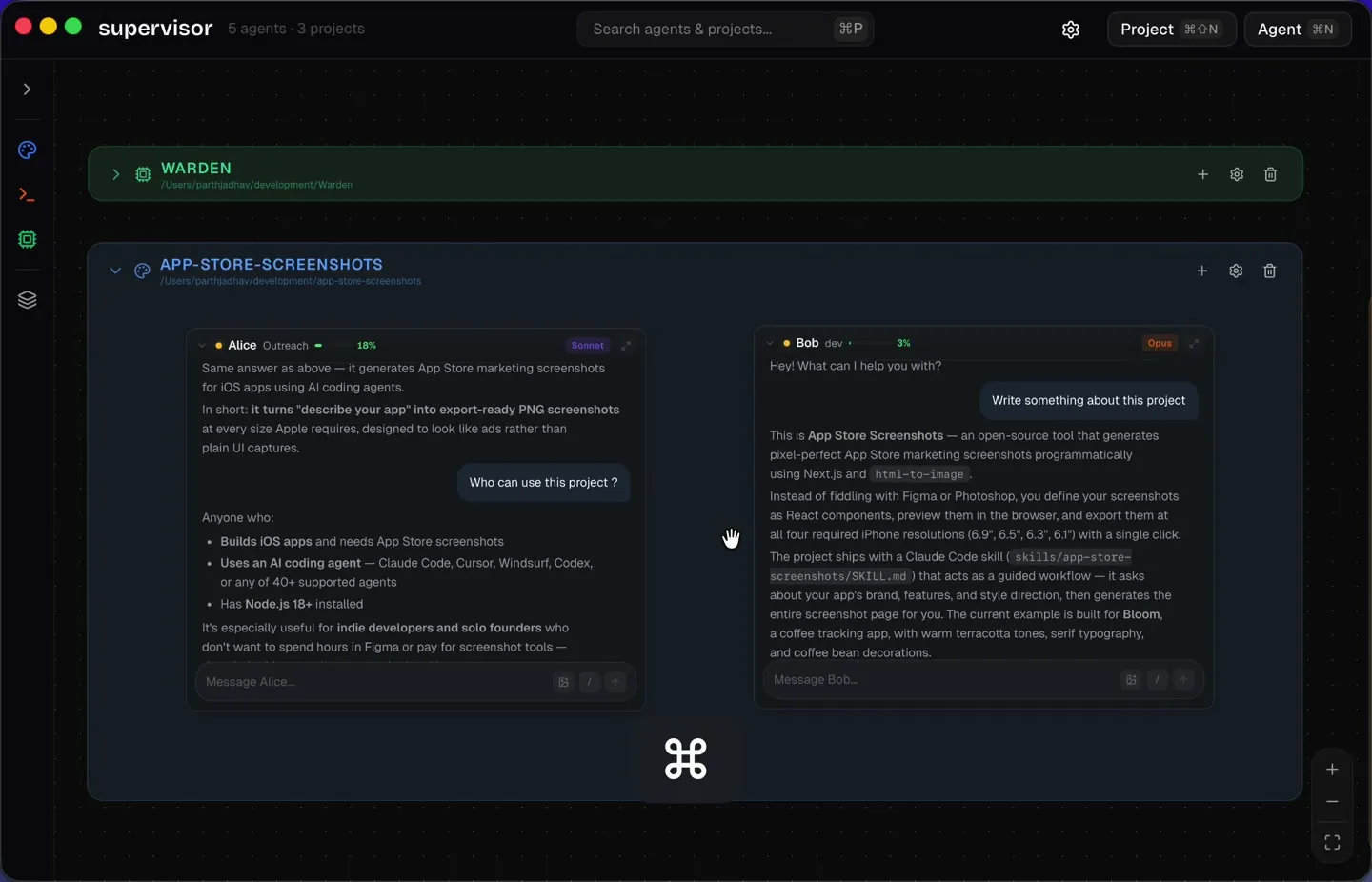
Cmd+K to jump between agents. Cmd+P to search everything. The same keyboard-first shortcuts you already know from VS Code and your browser. Because when you're managing multiple agents, milliseconds matter.
Slash Commands, Image Context, Custom Agents
Every agent supports slash commands: clear context, check costs, review PRs, all from the composer. You can paste screenshots and drag in mockups; agents see and reason about images natively. And you can configure each agent with a name, role, model, and system prompt, creating specialists that know exactly what to do.
Create Agent
Defaults are enough for most agents. Add a role or instructions only when this one needs a specific job.
Why an Infinite Canvas?
I could have built this as a dashboard. Or a split-pane terminal manager. But I deliberately chose an infinite canvas, and here's why:
Work with agents is spatial, not linear.
When you manage multiple agents, you're not following a single thread. You're overseeing a system. You need to see relationships, proximity, groupings. An agent working on the frontend is conceptually near the agent working on the API it calls. A canvas lets you express that. A list of tabs doesn't.
The canvas also scales. Two agents? Easy. Ten agents across four projects? Still manageable. You zoom out, you see the landscape, you zoom into what needs attention. It's the same mental model as a physical workspace: you arrange things where they make sense, and you move your attention, not the things themselves.
The Real Win: Less Context Switching
Here's the thing about context switching that nobody quantifies: it's not the switch itself that costs you. It's the reload.
Every time you switch from one terminal to another, you have to re-read the last few messages, remember what you asked this agent to do, figure out where it is in the task. That's 10-30 seconds per switch, and if you're doing it dozens of times an hour, you're burning real cognitive budget.
With Supervisor, you don't switch. You glance. The canvas shows you the state of every agent in your peripheral vision. You notice when something finishes, or when an agent is waiting for input, without having to actively go check. Desktop notifications fill in the gaps when you're focused elsewhere.
What this does is flip the model: instead of you pulling status from each agent, the system pushes awareness to you. That's a fundamental difference, and it compounds over a full workday.
The Vision: Hands-Free Orchestration
Here's where it gets interesting. Everything I've described so far (the canvas, the focus view, the project scoping) is the foundation. But Supervisor wasn't built to stop at "a nicer way to manage terminals on a graph."
The vision is hands-free orchestration of agents.
Imagine this: you open Supervisor, and instead of manually creating agents and assigning tasks, you talk to a Supervisor agent, a meta-agent that sits above all your other agents. You say:
"What's the status of the authentication refactor?"
The Supervisor agent knows which project that belongs to, finds the agent working on it, and gives you a summary. No clicking, no searching, no context loading.
Or:
"The login page has a bug where the error message doesn't clear. Fix it."
The Supervisor agent figures out which project and which agent should handle it, routes the task, and the right agent picks it up. You just stated your intent. The system figured out the how.
Take it further: connect your project management tool. Point the Supervisor agent at a Jira board. Ask it:
"What's the status of PROJ-142?"
It finds the relevant agent, queries the state of the work, cross-references the ticket, and reports back. Or better yet, you tell it to pick up PROJ-142, and it assigns the ticket to the right agent and kicks off the work. You're not orchestrating agents anymore. You're orchestrating outcomes.
This is the trajectory:
- Agent-to-agent handoff. Agents pass work to each other automatically. A backend agent finishes an API endpoint and hands it off to the frontend agent to wire up the UI.
- Voice orchestration. Speak your intent. The app figures out which agent should handle it. No typing, no clicking.
- Mobile companion. Monitor and manage your agents from your phone. Check in on a build while you're making coffee.
That's the future I'm building toward.
A Weekend Project With a Bigger Point
I built the first version of Supervisor in a weekend. It's a personal project, born out of genuine frustration with how I was working with agents day to day. It currently works with Claude Code, and it's open source. You can download it, run it, and try it yourself.
But the bigger point isn't this specific tool. It's this:
We need to rethink how we work with agents.
The current paradigm (one terminal, one agent, one task) is a holdover from a world where we interacted with one AI at a time. We're already past that. People are running multiple agents concurrently, across multiple codebases, on complex projects. And the interfaces haven't caught up.
We need tools that treat agent orchestration as a first-class problem. Tools that give us visibility, reduce context switching, and ultimately let us step back from the minutiae of managing individual agents so we can focus on the work that actually matters: deciding what to build.
Supervisor is one take on that. I'm sure there will be others. But the conversation needs to start, and I think it starts with a simple question:
What if managing agents felt less like juggling, and more like conducting?
How It's Built
Supervisor is built with Tauri (Rust backend + web frontend), React, and TypeScript. The entire app is ~20MB on disk. No bundled Chromium, no Electron bloat. It feels native because it basically is.
Under the hood:
- Rust backend manages Claude Code processes, each running as a child process with stdin/stdout communication via JSON streaming. Process lifecycle, message routing, and state persistence are all handled in Rust.
- SQLite database stores agents, projects, canvas positions, notification preferences. Everything persists across sessions.
- React + Zustand frontend renders the canvas using React Flow for the node graph, with custom components for agent cards, chat views, and project zones.
- TCP socket server enables a CLI tool to communicate with the running app, so you can spawn agents from your terminal.
- Event router translates Claude Code's NDJSON streaming output into typed Tauri events that the frontend consumes in real-time.
It's cross-platform (macOS, Windows, Linux), open source, and MIT licensed.
Supervisor is free, open source, and available now. Check out the website, grab it from GitHub, or install it with:
brew install --cask ParthJadhav/supervisor/supervisorI'd love to hear what you think, and what your experience has been managing multiple agents.